The Option LLC The Option
The Option LLC

A Better Way Forward.

Built from
experience

Real world.
Real solutions.

Created for
impact

Innovative tools.
Practical results.

Mission focused.
People first.

Safety, reliability
and trust.

Adaptable today.
Ready for tomorrow.

Flexible solutions
that grow with you.

One company. Many solutions. Your next option.
What we build

Focused tools for work that has to be done right.

Every product starts from a procedure someone actually has to complete. Small footprint, no accounts to manage, and output in a format your organization already accepts.

SLP Den app icon

SLP Den

iPad

Session data tracking for school-based speech-language pathologists. Score up to six students at once while the session is still running, with a timer on each, then leave with a spreadsheet per student instead of an evening of paperwork.

  • Status On the App Store
  • Data On device only
  • Output Spreadsheet per student
Guardian Checklist app icon

Guardian Checklist

iPhone & iPad

Structured walkthroughs for facility and workplace safety. Findings are captured with photos, prioritized, and delivered as a report you can file — not notes you have to translate later.

  • Status On the App Store
  • Data On device & iCloud
  • Output PDF & Word report
Cross Check WX app icon

Cross Check WX

Apple TV, iPhone & iPad

A weather wall for flight operations. Put live station boards, radar, airspace and hazards on any TV in the ops room, then change what each screen shows and post ops messages from your iPhone or iPad.

  • Status Coming to the App Store
  • Data Your own iCloud
  • Weather NWS, AWC & FAA
Photo Booth app icon

Photo Booth

iPad kiosk

Turns an iPad into a working event photo booth. Guests shoot, print on the spot, and take a digital copy home by scanning a code — with no attendant standing over the setup all night.

  • Status In build
  • Printing Compact dye-sub
  • Delivery Print & QR
The Option Consulting icon

Consulting

Advisory & custom build

Efficiency through technology. Process assessment, workflow design, and custom application development for organizations that have outgrown the spreadsheet but do not want an enterprise platform.

  • Status Selective engagements
  • Focus Safety & operations
  • Format Project or retainer
A closer look

The data sheet is finished when the session is.

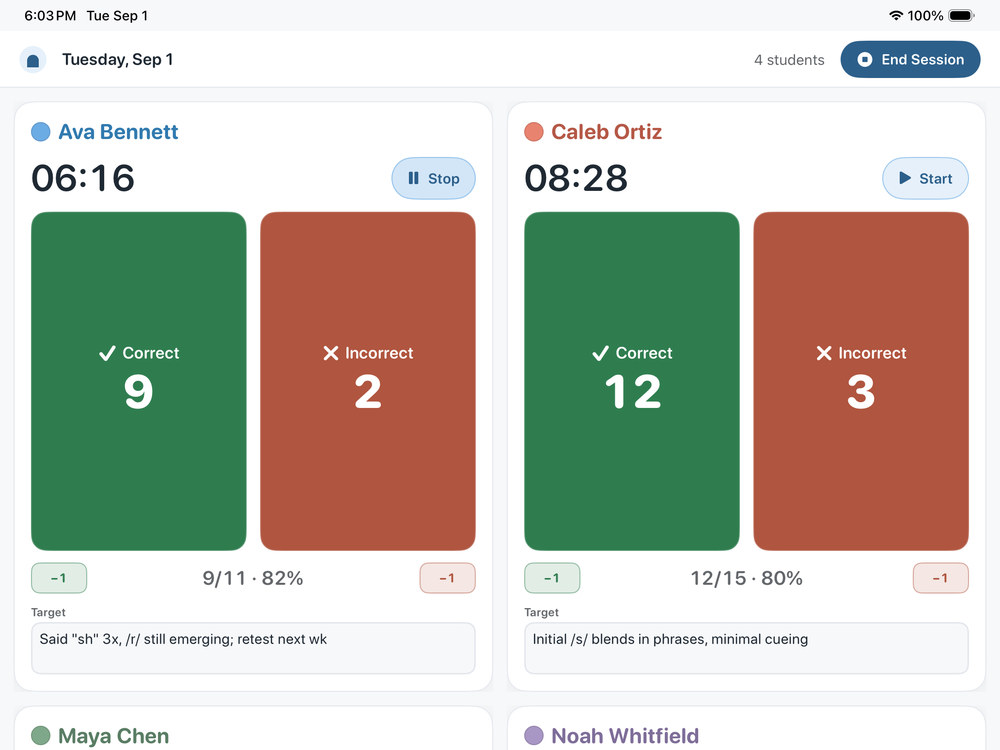
SLP Den was built for one job: recording therapy data while therapy is still happening. Tap to score, keep a timer on every student, and finish with a spreadsheet you can hand to a team meeting. Nothing is uploaded, because there is nowhere for it to go — the app has no networking code at all.

SLP Den running a live session on iPad, with correct and incorrect counters and a timer for each student.
Score trials as they happen
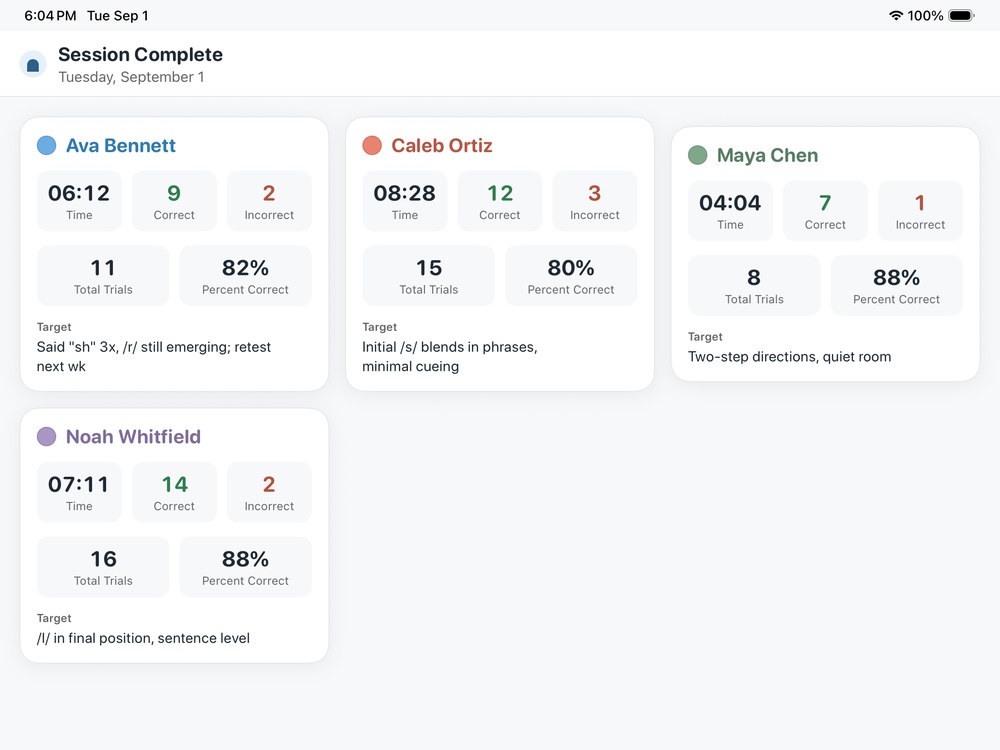
SLP Den session summary showing time, trial counts and percent correct for each student.
Totals the moment you finish
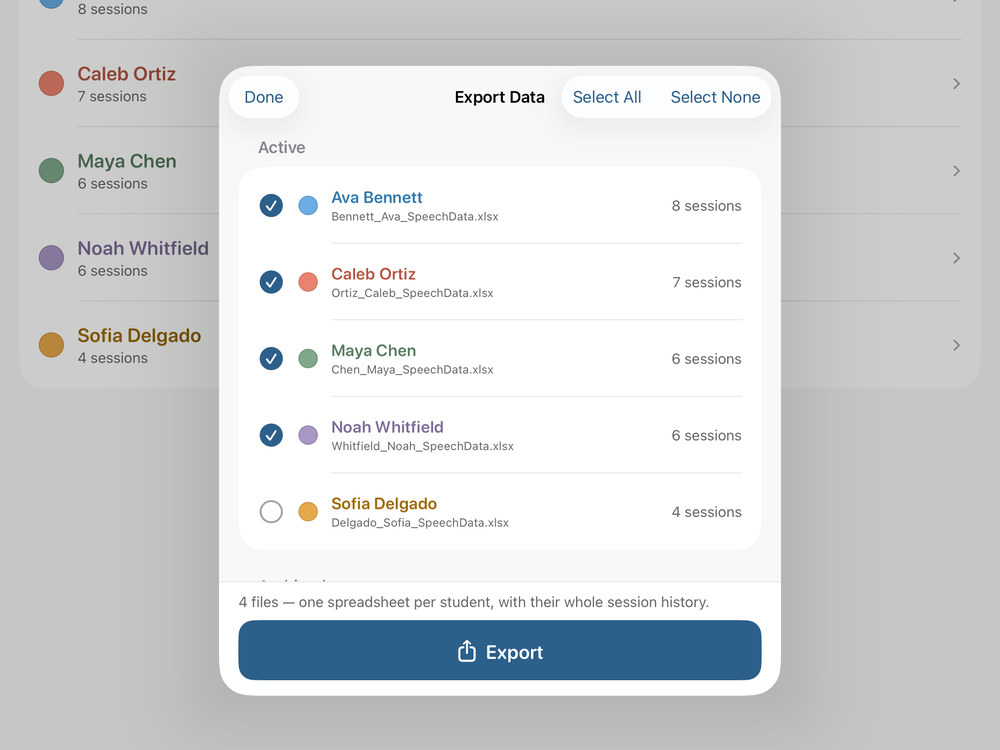
SLP Den export picker listing one spreadsheet file per student.
One spreadsheet per student
Download on the App Store Ask about SLP Den iPad · no account · data stays on the device
A closer look

From walkthrough to finished report, in one place.

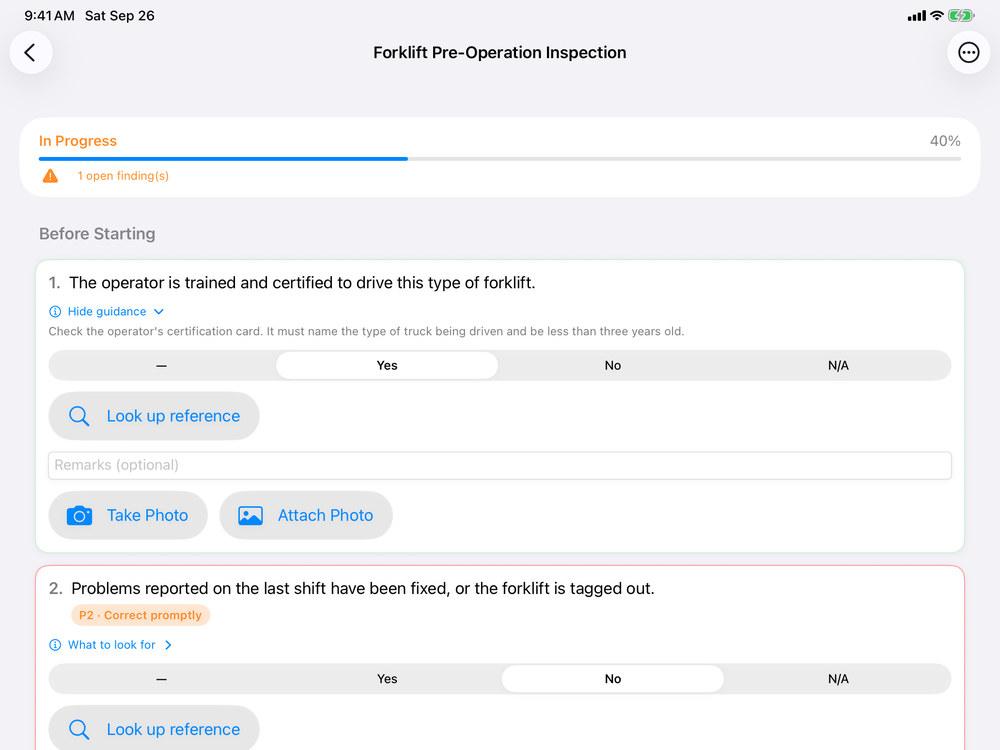
Guardian Checklist takes a safety inspection from the first question to the final report. Work through OSHA-based checklists with the guidance built in, log each deficiency with a photo and a clear priority, and track every corrective action to closure. When the walkthrough is done, the report is already written.

Guardian Checklist working through a forklift pre-operation inspection, with built-in guidance, reference lookup and photo capture for each question.
Checklists with the guidance built in
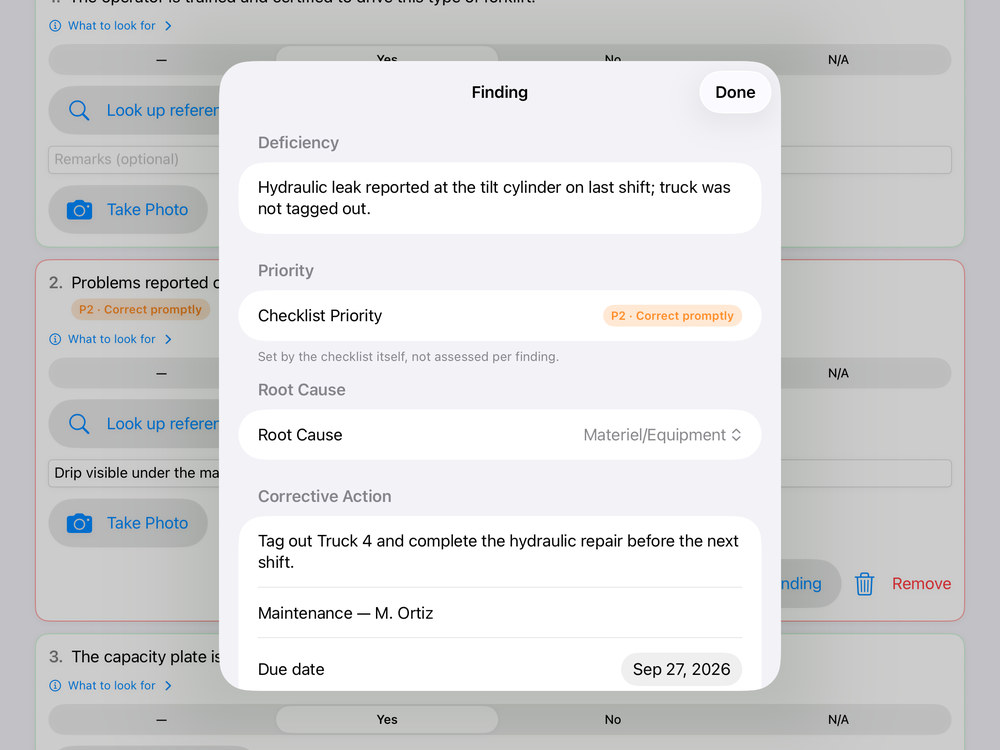
Guardian Checklist finding editor recording a deficiency, its priority, root cause, corrective action, owner and due date.
Every deficiency, prioritized
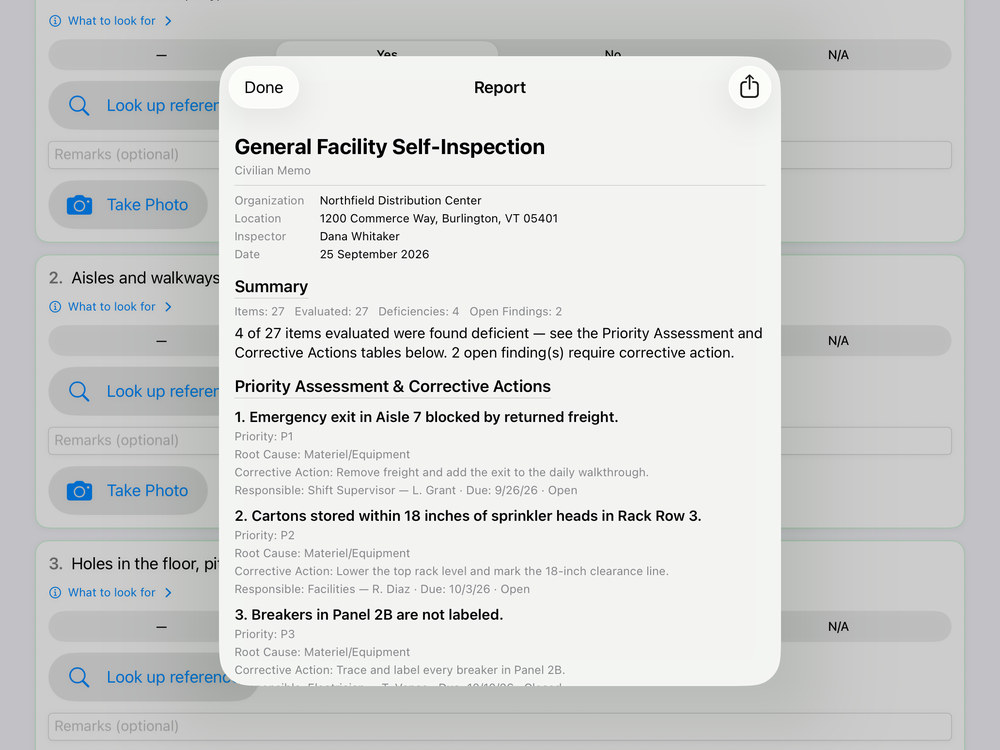
Guardian Checklist inspection report with a summary and a priority assessment of corrective actions.
A finished report, ready to share
Download on the App Store Ask about Guardian Checklist iPhone & iPad · nine OSHA-based checklists · PDF & Word reports
A closer look

The whole ops room sees the same weather.

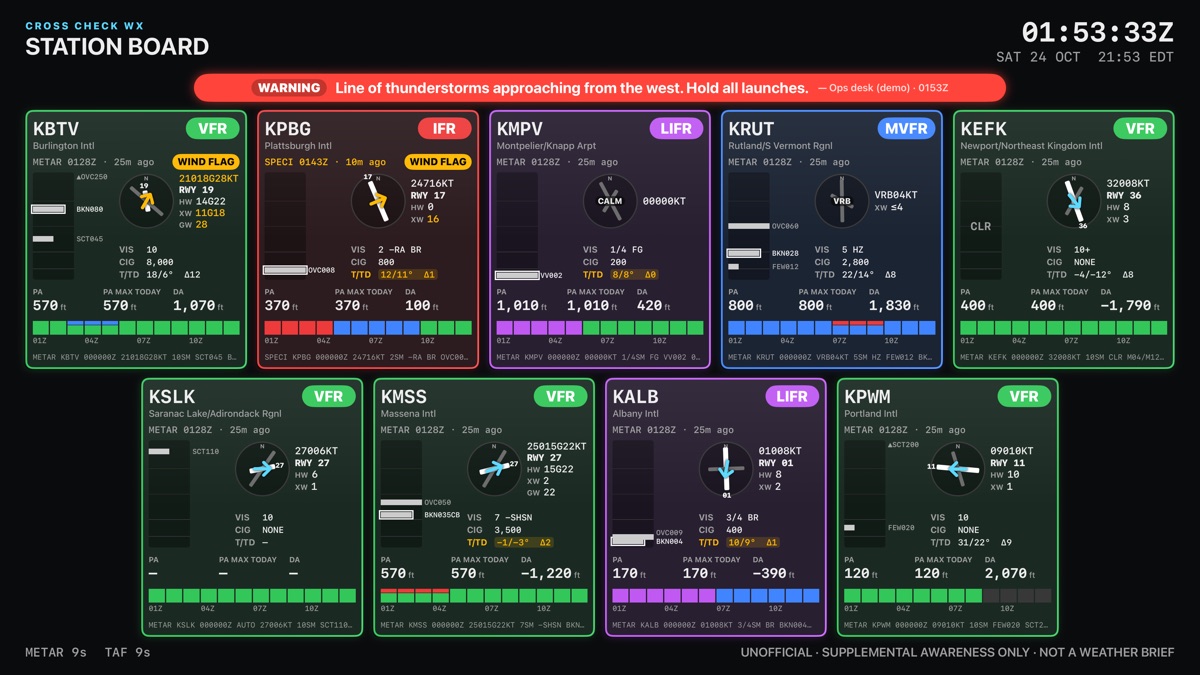
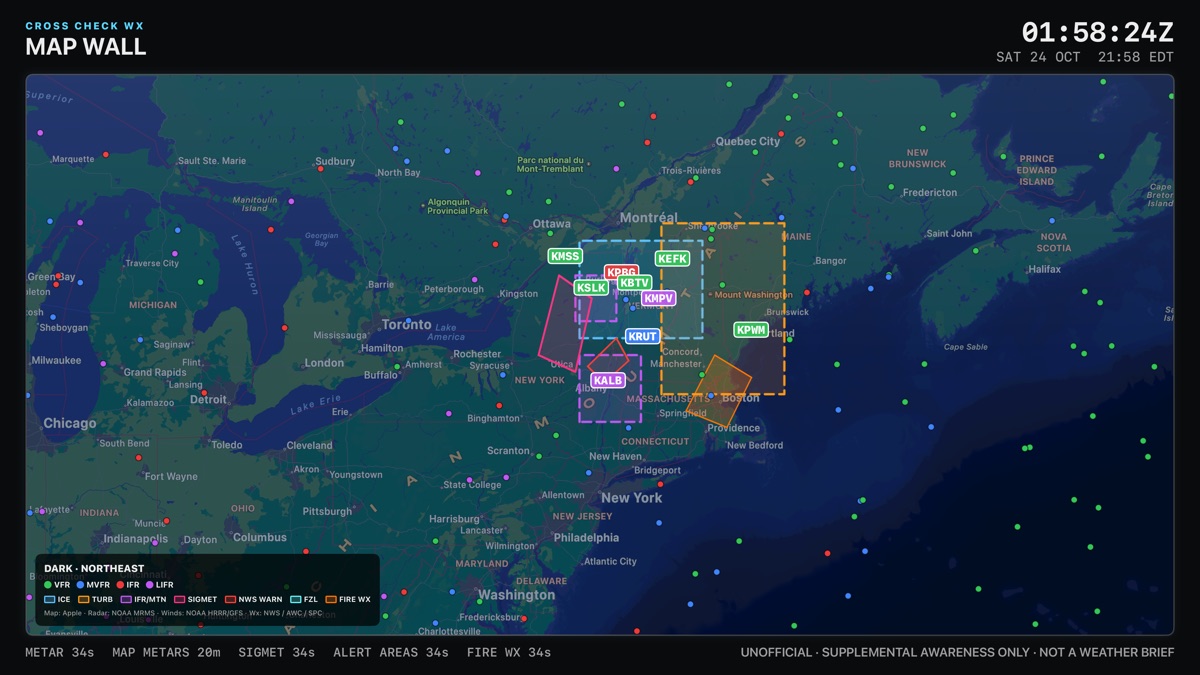
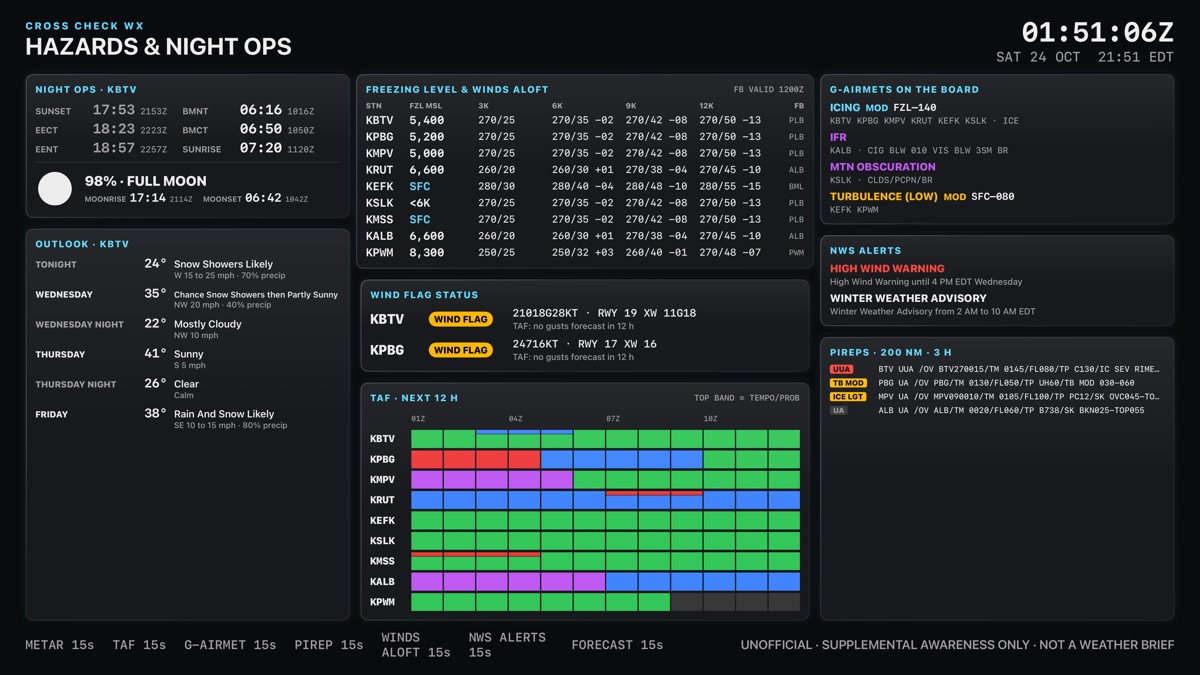
Cross Check WX turns the TVs in an operations center into a weather wall. Station boards show flight category, winds, crosswind and gust flags for every airfield you choose. The map wall layers radar, airspace, AIRMETs, SIGMETs and NWS alerts. When conditions change, post an Info, Caution or Warning from your phone and it appears on every screen in seconds. Everything is stored in your own iCloud. There are no accounts to create and no servers of ours in between.

Cross Check WX station board on a TV, showing flight category, winds and conditions for ten airfields under a red Warning banner.
Every airfield at a glance
Cross Check WX map wall showing radar, airspace and weather alert areas over the northeastern United States.
Radar, airspace and alerts on one map
Cross Check WX hazards screen summarizing active advisories, alerts and night operations information.
Hazards and night ops, summarized
Coming soon to the App Store Ask about Cross Check WX Apple TV, iPhone & iPad · supplemental awareness, not an official weather briefing
Our approach

Built by someone who has had to fill out the paperwork.

The Option LLC is a Vermont company. The products come from two decades of operational work in aviation, safety, and organizational leadership — fields where a checklist that does not fit the job is worse than no checklist at all.

Small on purpose

No accounts to provision, no backend to breach. Your data stays on your device unless you choose to send it.

Built to be finished

A tool should end with a signed, filed, defensible record — not a dashboard someone has to interpret.

Made to fit

Standards vary by organization. Products are designed to adapt to your process instead of forcing a new one.

Contact

Tell us what you are trying to solve.

Two inboxes, so your message reaches the right place.

General & product info@theoptionllc.com

Early access, consulting, partnerships, and press.

Technical & support dev@theoptionllc.com

Bug reports, integration questions, and feature requests.

Replies within two business days.

Follow along

Product news, build notes, and release announcements.